Task Queue Priority and Fairness
Task Queue Priority and Task Queue Fairness are two ways to manage the distribution of work within a Task Queue. Priority allows Tasks to be executed in Priority order. Fairness prevents one set of Tasks from blocking others within the same priority level.
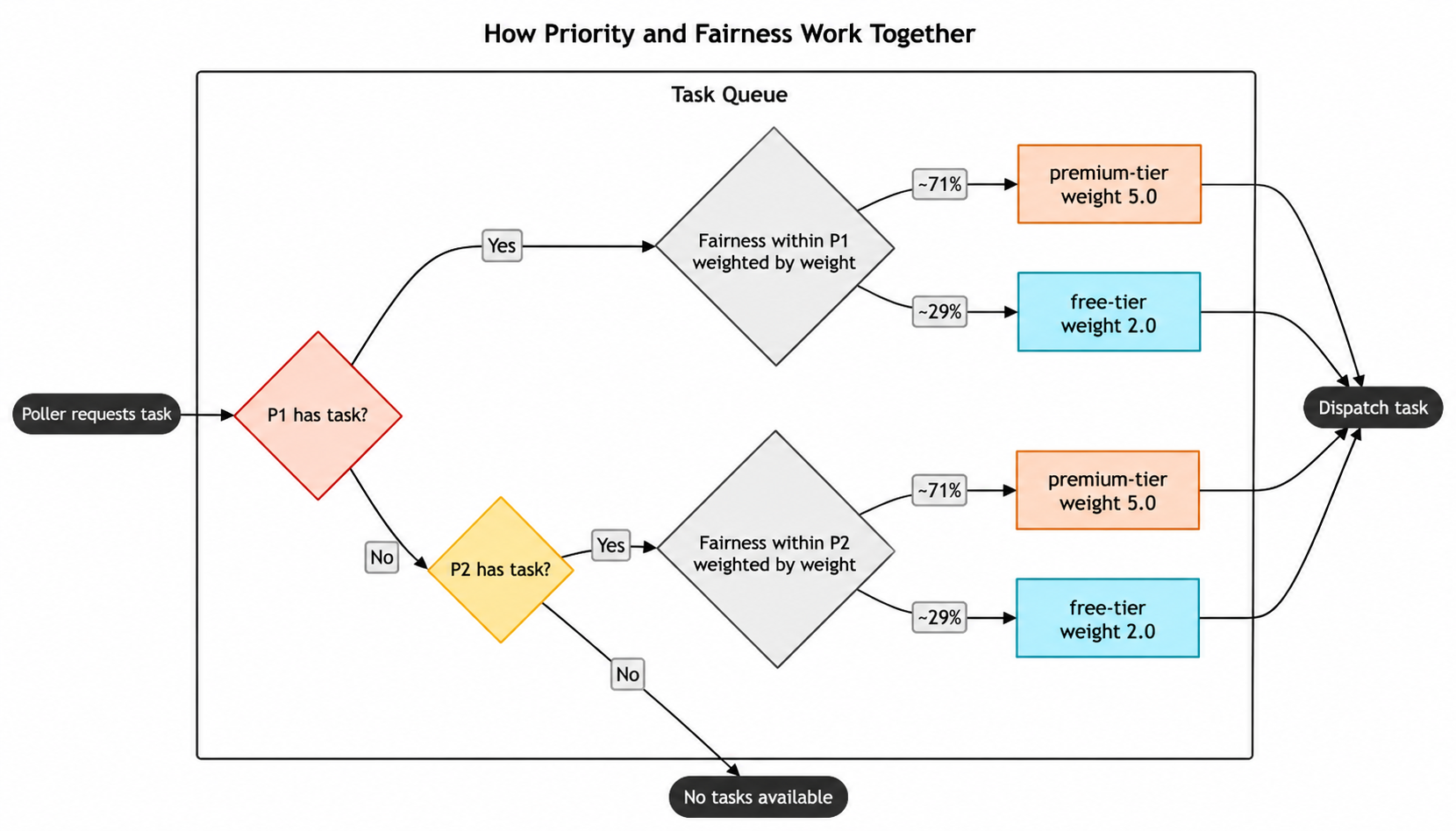
You can use Priority and Fairness individually or combine them to express Fairness within a Priority level.
Task Queue Priority
Task Queue Priority lets you control the execution order of Workflows, Activities, and Child Workflows based on assigned priority values within a Task Queue. Each priority level acts as a sub-queue that separates Tasks so that high priority Tasks can cut in front of low priority Tasks.
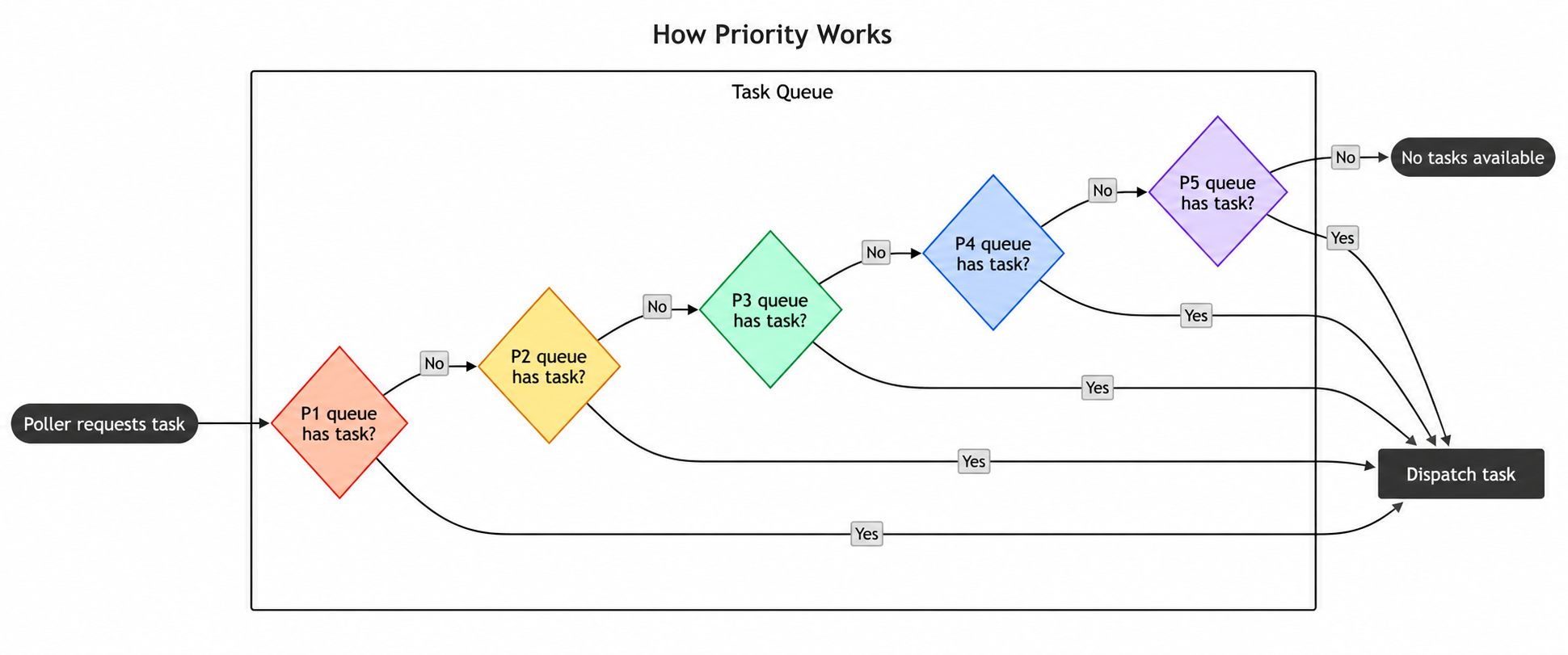
Priority is enforced within a single Task Queue partition. A Task Queue by default uses multiple partitions and randomly distributes Tasks across them, so partitions are usually balanced and priority ordering closely approximates the Task Queue as a whole. When partitions become imbalanced, lower-priority Tasks on a lighter partition can dispatch ahead of higher-priority Tasks waiting on a heavier one.
When to use Priority
If you need a way to specify the order your Tasks execute in, you can use Priority to manage that. Priority lets you differentiate between your Tasks, like batch and real-time Tasks, so that you can use a single pool of Workers for efficient resource allocation, while ensuring real-time Tasks are processed ahead of batch Tasks.
You can also use this as a way to run urgent Tasks immediately and override others. For example, if you are running an e-commerce platform, you may want to process payment related Tasks before less time-sensitive Tasks like internal inventory management.
How to use Priority
Priority is enabled by default in both Temporal Cloud and self-hosted Temporal. To disable Priority in self-hosted Temporal, set the dynamic config matching.useNewMatcher to false on a Task Queue, Namespace, or globally.
To use Priority, you need to set a priority key at the Workflow, Activity, or Child Workflow level to a value within the integer range [1,5].
A lower value implies higher priority, so 1 is the highest priority level. If you don't specify a Priority, a Task defaults to a
Priority of 3. Activities and Child Workflows will inherit their Workflow's priority unless they explicitly specify
their own priority.
When Priority is enabled, all Tasks within a Task Queue will be processed in Priority order. For example, all priority level 1 Tasks will start executing before the first priority level 2 Task, and so on. Lower priority Tasks will be blocked until all higher priority Tasks have started. Tasks are scheduled by default to run in first-in-first-out (FIFO) order within each priority level. If you need greater control of task ordering within a priority level, such as preventing large tenants from overwhelming small tenants, check out the Fairness section.
You can set a Workflow's priority key via the CLI like so:
temporal workflow start \
  --type ChargeCustomer \
  --task-queue my-task-queue \
  --workflow-id my-workflow-id \
  --input '{"customerId":"12345"}' \
  --priority-key 1
You can set priority keys for a Workflow within the SDK like so:
workflowOptions := client.StartWorkflowOptions{
  ID:        "my-workflow-id",
  TaskQueue: "my-task-queue",
  Priority:  temporal.Priority{PriorityKey: 5},
}
we, err := c.ExecuteWorkflow(context.Background(), workflowOptions, MyWorkflow)
WorkflowOptions options = WorkflowOptions.newBuilder()
  .setTaskQueue("my-task-queue")
  .setPriority(Priority.newBuilder().setPriorityKey(5).build())
  .build();

WorkflowClient client = WorkflowClient.newInstance(service); MyWorkflow workflow =
client.newWorkflowStub(MyWorkflow.class, options); workflow.run();
var handle = await Client.StartWorkflowAsync(
  (MyWorkflow wf) => wf.RunAsync("hello"),
  new StartWorkflowOptions(
    id: "my-workflow-id",
    taskQueue: "my-task-queue"
  )
  {
    Priority = new Priority(1),
  }
);
await client.start_workflow(
  MyWorkflow.run,
  args="hello",
  id="my-workflow-id",
  task_queue="my-task-queue",
  priority=Priority(priority_key=1),
)
You can set priority keys for an Activity within the SDK like so:
ao := workflow.ActivityOptions{
  StartToCloseTimeout: time.Minute,
  Priority:            temporal.Priority{PriorityKey: 3},
}
ctx := workflow.WithActivityOptions(ctx, ao)
err := workflow.ExecuteActivity(ctx, MyActivity).Get(ctx, nil)
ActivityOptions options = ActivityOptions.newBuilder()
  .setStartToCloseTimeout(Duration.ofMinutes(1))
  .setPriority(Priority.newBuilder().setPriorityKey(3).build())
  .build();

MyActivity activity = Workflow.newActivityStub(MyActivity.class, options); activity.perform();
await Workflow.ExecuteActivityAsync(
  () => SayHello("hi"),
    new()
    {
      StartToCloseTimeout = TimeSpan.FromSeconds(5),
      Priority = new(3),
    }
  );
await workflow.execute_activity(
  say_hello,
  "hi",
  priority=Priority(priority_key=3),
  start_to_close_timeout=timedelta(seconds=5),
)
You can set priority keys for a Child Workflow within the SDK like so:
cwo := workflow.ChildWorkflowOptions{
  WorkflowID: "child-workflow-id",
  TaskQueue:  "child-task-queue",
  Priority:   temporal.Priority{PriorityKey: 1},
}
ctx := workflow.WithChildOptions(ctx, cwo)
err := workflow.ExecuteChildWorkflow(ctx, MyChildWorkflow).Get(ctx, nil)
ChildWorkflowOptions childOptions = ChildWorkflowOptions.newBuilder()
  .setTaskQueue("child-task-queue")
  .setWorkflowId("child-workflow-id")
  .setPriority(Priority.newBuilder().setPriorityKey(1).build())
  .build();

MyChildWorkflow child = Workflow.newChildWorkflowStub(MyChildWorkflow.class, childOptions); child.run();
await Workflow.ExecuteChildWorkflowAsync(
  (MyChildWorkflow wf) => wf.RunAsync("hello child"),
  new() { Priority = new(1) }
);
await workflow.execute_child_workflow(
  MyChildWorkflow.run,
  args="hello child",
  priority=Priority(priority_key=1),
)
Task Queue Fairness
Task Queue Fairness lets you distribute Tasks based on fairness keys and fairness weights within a Task Queue.
Fairness keys organize Tasks into groups such as tenants, applications, or workload types. Weighted fair dispatch selects among groups that have backlogged Tasks. This keeps a group that fills the backlog from dominating dispatch.
Each fairness key has a default fairness weight of 1.0. You can assign a different weight to a key. When two groups have backlogged Tasks, a group with a weight of 2.0 receives approximately twice as many dispatches as a group with a weight of 1.0.
When to use Fairness
Fairness is intended to address common situations like:
- Multi-tenant applications with big and small tenants where small tenants shouldn't be blocked by big ones.
- Assigning Tasks to weighted groups and dispatching approximately 80% from one group and 20% from another when both have backlogged Tasks.
It sequences Tasks in the Task Queue probabilistically using a weighted distribution based on:
- Fairness weights you set
- The current backlog of Tasks
- A data structure that tracks how you've distributed Tasks for different fairness keys
As an example, imagine a workload with three tenants, tenant-big, tenant-mid, tenant-small, that have varying numbers of Tasks at all times. Your tenant-big has a large number of Tasks that can overwhelm your Task Queue and prevent tenant-mid and tenant-small from running their Tasks. With Fairness, you can give each tenant a different fairness key to make sure tenant-big doesn't dominate dispatch and block the others. In this case, tenant-mid and tenant-small will have Tasks run in between tenant-big Tasks so that they are executed "fairly".
How to use Fairness
Fairness is available for both self-hosted Temporal instances and Temporal Cloud.
To enable Fairness for a Namespace in Temporal Cloud, navigate to the Namespace's Overview page in the UI and activate the Fairness toggle. Note that Fairness is a paid feature in Temporal Cloud. For more information, see Fairness pricing.
If you're self-hosting Temporal, set matching.enableFairness to true in the dynamic config on the relevant Task Queues or Namespaces.
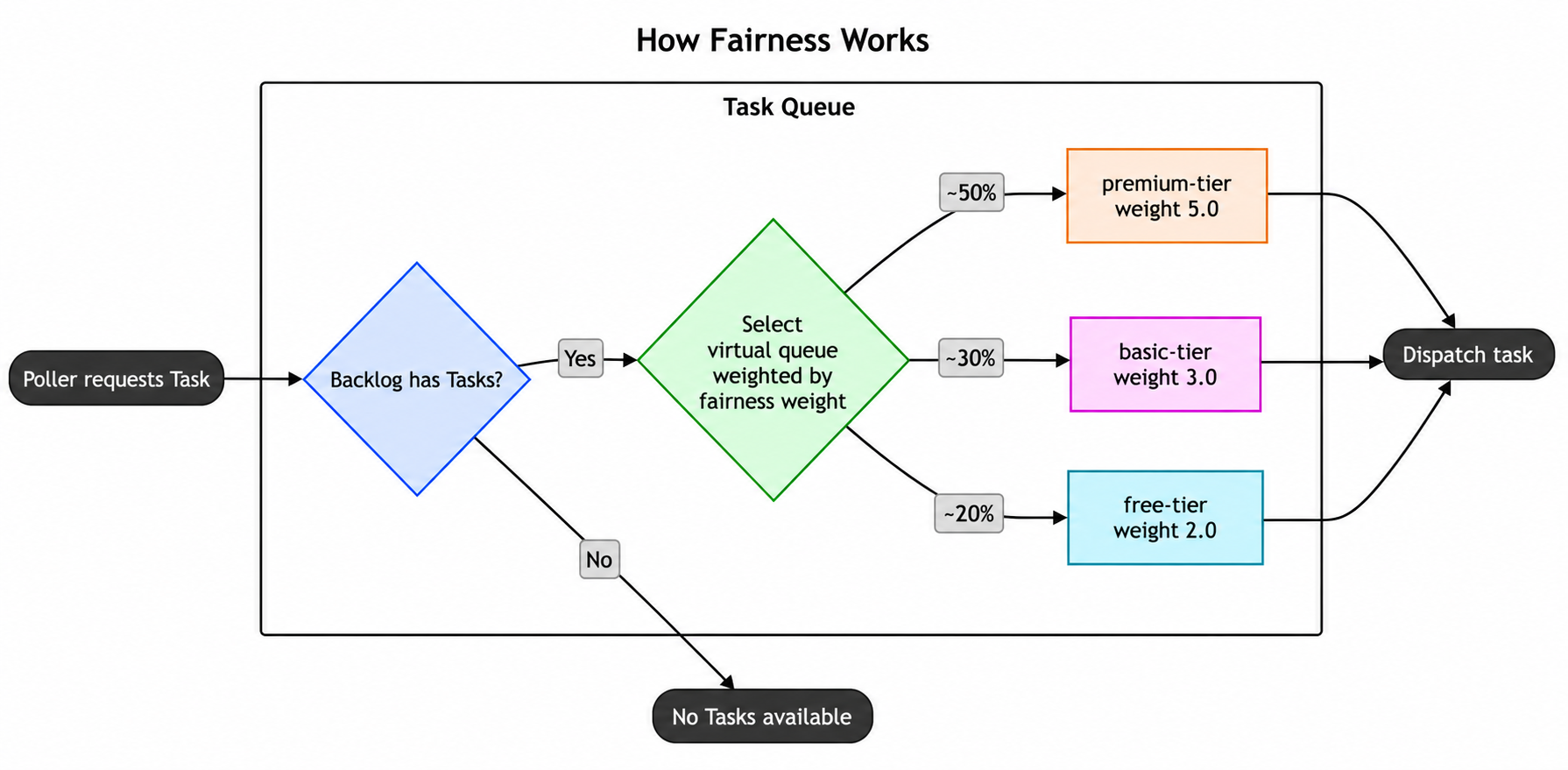
To use Fairness, set fairness keys and optionally fairness weights at the Workflow, Activity, or Child Workflow level. Tasks with different fairness keys are dispatched in proportion to their fairness weights. For example, weights of 5.0 for premium-tier, 3.0 for basic-tier, and 2.0 for free-tier cause approximately 50% of dispatched Tasks to come from premium-tier, 30% from basic-tier, and 20% from free-tier when all three groups have backlogged Tasks. Within the same priority level and Task Queue partition, Tasks in the backlog with the same fairness key are dispatched in FIFO order.
You can set a Workflow's fairness key and weight via the CLI like so:
temporal workflow start \
  --type ChargeCustomer \
  --task-queue my-task-queue \
  --workflow-id my-workflow-id \
  --input '{"customerId":"12345"}' \
  --priority-key 1 \
  --fairness-key a-key \
  --fairness-weight 3.14
You can set fairness keys and weights for a Workflow within the SDK like so. Select a concept to highlight the matching lines:
workflowOptions := client.StartWorkflowOptions{ID: "my-workflow-id",TaskQueue: "my-task-queue",Priority: temporal.Priority{PriorityKey: 1,FairnessKey: "a-key",FairnessWeight: 3.14,},}we, err := c.ExecuteWorkflow(context.Background(), workflowOptions, MyWorkflow)
WorkflowOptions options = WorkflowOptions.newBuilder().setTaskQueue("my-task-queue").setPriority(Priority.newBuilder().setPriorityKey(5).setFairnessKey("a-key").setFairnessWeight(3.14).build()).build();WorkflowClient client = WorkflowClient.newInstance(service);MyWorkflow workflow = client.newWorkflowStub(MyWorkflow.class, options);workflow.run();
var handle = await Client.StartWorkflowAsync((MyWorkflow wf) => wf.RunAsync("hello"),new StartWorkflowOptions(id: "my-workflow-id",taskQueue: "my-task-queue"){Priority = new Priority(priorityKey: 3,fairnessKey: "a-key",fairnessWeight: 3.14)});
await client.start_workflow(MyWorkflow.run,args="hello",id="my-workflow-id",task_queue="my-task-queue",priority=Priority(priority_key=3,fairness_key="a-key",fairness_weight=3.14,),)
client.start_workflow(MyWorkflow, "input-arg",id: "my-workflow-id",task_queue: "my-task-queue",priority: Temporalio::Priority.new(priority_key: 3,fairness_key: "a-key",fairness_weight: 3.14))
const handle = await startWorkflow(workflows.priorityWorkflow, {args: [false, 1],priority: {priorityKey: 3,fairnessKey: 'a-key',fairnessWeight: 3.14,},});
You can set fairness keys and weights for an Activity within the SDK like so:
ao := workflow.ActivityOptions{
    StartToCloseTimeout: time.Minute,
    Priority: temporal.Priority{
    PriorityKey: 1,
    FairnessKey: "a-key",
    FairnessWeight: 3.14,
  },
}
ctx := workflow.WithActivityOptions(ctx, ao)
err := workflow.ExecuteActivity(ctx, MyActivity).Get(ctx, nil)
ActivityOptions options = ActivityOptions.newBuilder()
  .setStartToCloseTimeout(Duration.ofMinutes(1))
  .setPriority(Priority.newBuilder().setPriorityKey(3).setFairnessKey("a-key").setFairnessWeight(3.14).build())
  .build();
MyActivity activity = Workflow.newActivityStub(MyActivity.class, options);
activity.perform();
var handle = await Client.StartWorkflowAsync(
  (MyWorkflow wf) => wf.RunAsync("hello"),
  new StartWorkflowOptions(
    id: "my-workflow-id",
    taskQueue: "my-task-queue"
  )
  {
    Priority = new Priority(
      priorityKey: 3,
      fairnessKey: "a-key",
      fairnessWeight: 3.14
    )
  }
);
await workflow.execute_activity(
  say_hello,
  "hi",
  priority=Priority(priority_key=3, fairness_key="a-key", fairness_weight=3.14),
  start_to_close_timeout=timedelta(seconds=5),
)
client.start_activity(
  MyActivity, "input-arg",
  id: "my-workflow-id",
  task_queue: "my-task-queue",
  priority: Temporalio::Priority.new(
    priority_key: 3,
    fairness_key: "a-key",
    fairness_weight: 3.14
  )
)
const handle = await startWorkflow(workflows.priorityWorkflow, {
  args: [false, 1],
  priority: { priorityKey: 3, fairnessKey: 'a-key', fairnessWeight: 3.14 },
});
You can set fairness keys and weights for a Child Workflow within the SDK like so:
cwo := workflow.ChildWorkflowOptions{
  WorkflowID: "child-workflow-id",
  TaskQueue:  "child-task-queue",
  Priority:   temporal.Priority{
    PriorityKey:    1,
    FairnessKey:    "a-key",
    FairnessWeight: 3.14,
  },
}
ctx := workflow.WithChildOptions(ctx, cwo)
err := workflow.ExecuteChildWorkflow(ctx, MyChildWorkflow).Get(ctx, nil)
ChildWorkflowOptions childOptions = ChildWorkflowOptions.newBuilder()
  .setTaskQueue("child-task-queue")
  .setWorkflowId("child-workflow-id")
  .setPriority(Priority.newBuilder().setPriorityKey(1).setFairnessKey("a-key").setFairnessWeight(3.14).build())
  .build();
MyChildWorkflow child = Workflow.newChildWorkflowStub(MyChildWorkflow.class, childOptions);
child.run();
var handle = await Client.StartWorkflowAsync(
  (MyWorkflow wf) => wf.RunAsync("hello"),
  new StartWorkflowOptions(
    id: "my-workflow-id",
    taskQueue: "my-task-queue"
  )
  {
    Priority = new Priority(
      priorityKey: 3,
      fairnessKey: "a-key",
      fairnessWeight: 3.14
    )
  }
);
await workflow.execute_child_workflow(
  MyChildWorkflow.run,
  args="hello child",
  priority=Priority(priority_key=3, fairness_key="a-key", fairness_weight=3.14),
)
client.start_child_workflow(
  MyChildWorkflow, "input-arg",
  id: "my-child-workflow-id",
  task_queue: "my-task-queue",
  priority: Temporalio::Priority.new(
    priority_key: 3,
    fairness_key: "a-key",
    fairness_weight: 3.14
  )
)
const handle = await startChildWorkflow(workflows.priorityWorkflow, {
  args: [false, 1],
  priority: { priorityKey: 3, fairnessKey: 'a-key', fairnessWeight: 3.14 },
});
Tasks that do not have a fairness_key set are grouped under an implicit empty-string key with a default weight of 1.0. The group participates in weighted fair dispatch alongside named fairness keys. This lets you adopt Fairness incrementally.
There should only be one fairness weight assigned to each fairness key within a Task Queue. Having multiple fairness weights on a fairness key will result in unspecific behavior.
Choosing between Priority, Fairness, and both
- Priority alone when you need strict priority ordering - for example, separating real-time Tasks from batch Tasks.
- Fairness alone when you need weighted dispatch among tiers or tenants without ordering one group ahead of another.
- Both when you have a tiered SLA hierarchy - Priority for the broad tier (for example, paid vs. free), Fairness for per-tenant equity within a tier.
When you use Priority and Fairness together, the next Task to dispatch is chosen by walking three rules in order:
- Priority tier (strict). Tasks at a higher priority always dispatch before tasks at lower priorities, regardless of fairness keys or weights.
- Fairness key within a tier (weighted). Within a priority tier, Tasks are dispatched according to the weights of their fairness keys. When both groups are backlogged, a key with weight 2.0 receives approximately twice as many dispatches as a key with weight 1.0.
- FIFO within a key. Tasks that share a priority tier and fairness key dispatch in the order they were enqueued.
These rules apply within a Task Queue partition.
Inheritance
Each field of Priority (priority_key, fairness_key, fairness_weight) is resolved independently.
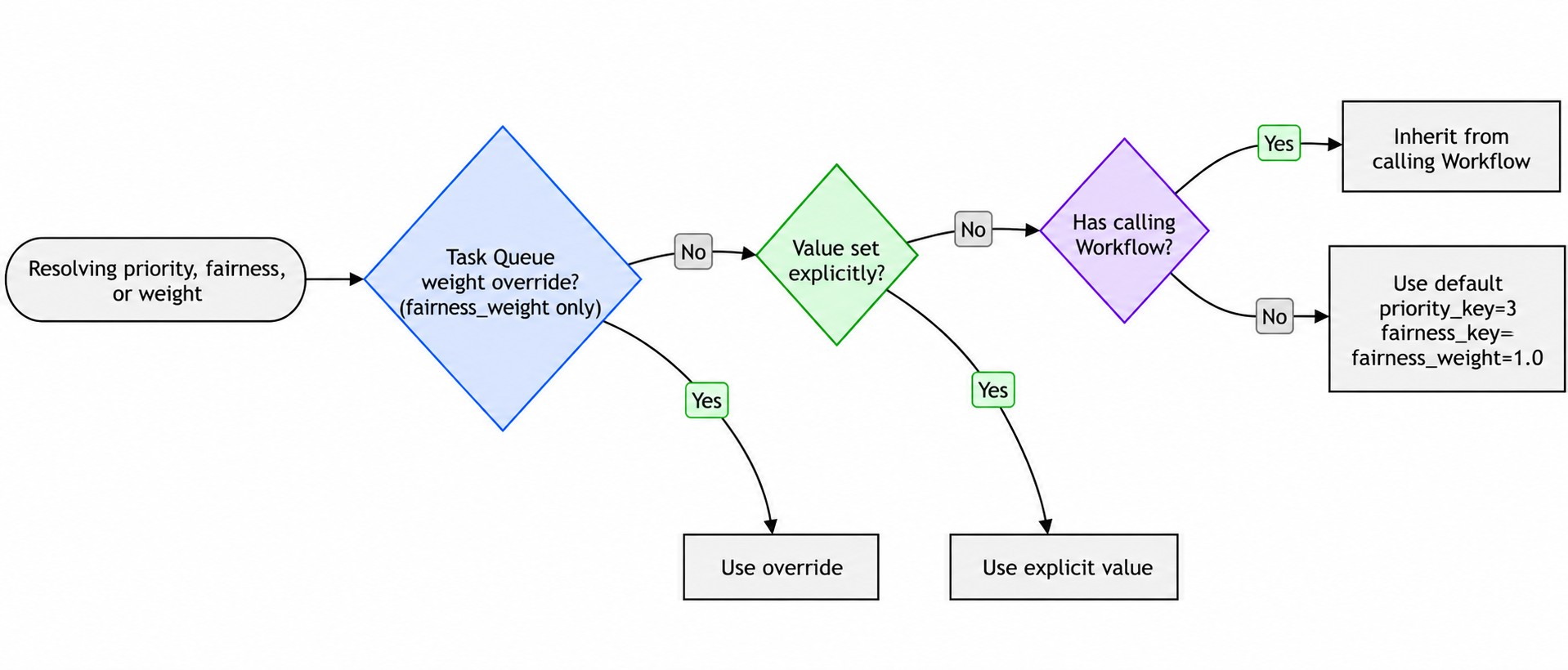
Activity inheritance order (highest precedence first):
- Fairness weight overrides on the Task Queue (
fairness_weightonly) - Value set explicitly in the Activity options
- Inherited from the calling Workflow
- Default value (
priority_key=3,fairness_key="",fairness_weight=1.0)
Workflow inheritance order (highest precedence first):
- Fairness weight overrides on the Task Queue (
fairness_weightonly) - Value set explicitly in the Workflow start options
- Inherited from the parent Workflow (Child Workflows only)
- Default value (
priority_key=3,fairness_key="",fairness_weight=1.0)
Continue-As-New inherits from the current execution unless explicit values are passed.
Enabling or disabling Fairness with an active backlog
When Fairness is enabled on a Namespace, Task Queues in the Namespace begin honoring fairness keys on Tasks for dispatch ordering. Existing queued Tasks are dispatched first, in their original priority + FIFO order. Fairness keys on Tasks already in the backlog do not retroactively affect their dispatch order.
When Fairness is disabled on a Namespace, Task Queues in the Namespace stop honoring fairness keys for dispatch ordering. The existing fairness-ordered backlog is dispatched first, in its original fairness order. After the backlog drains, Task Queues dispatch in priority + FIFO order.
In both directions, the existing backlog is dispatched before any new Tasks queued under the new mode. New Tasks dispatch only after the backlog fully drains. Tasks are not lost in either transition.
Set rate limits at the Task Queue level
Within a Task Queue, you can set dispatch rate limits for the whole queue using queue-rps-limit and for each fairness key using fairness-key-rps-limit-default.
temporal task-queue config set \
    --task-queue my-task-queue \
    --task-queue-type activity \
    --namespace my-namespace \
    --queue-rps-limit 500 \
    --queue-rps-limit-reason "overall limit" \
    --fairness-key-rps-limit-default 33.3 \
    --fairness-key-rps-limit-reason "per-key limit"
Whole queue rate limits: applies to the whole queue regardless of the fairness key. This is the same setting as is exposed through the Worker Options in the SDKs, and when set via the API, takes precedence over the limit set through Worker Options.
Fairness key rate limits: The per-fairness-key rate limit caps the dispatch rate for each fairness key. Some important notes on the per-fairness-key limit:
- The whole queue limit and per-fairness-key limit may be set independently: none, one or the other, or both may be set. If both are set, then the more restrictive one applies.
- The per-fairness-key limit for a key is scaled by the fairness weight assigned to that key. If the default limit is 10 Tasks per second, a key with weight 1.0 has a limit of 10 Tasks per second and a key with weight 2.5 has a limit of 25 Tasks per second.
- When a Task would exceed its key's rate limit, matching can skip it and dispatch another eligible Task.
Fairness weight overrides
You can override the weights of up to 1000 keys through the config API. When an override is set for a key, the weight attached to the Task, through Workflow or Activity priority metadata, will be ignored, and the overridden weight will be used instead.
Weight overrides are stored per Task Queue, including type, so they must be set for both Workflow and Activity Task Queues to take effect for both.
Set overrides with temporal task-queue config set:
temporal task-queue config set \
    --task-queue my-task-queue \
    --task-queue-type activity \
    --namespace my-namespace \
    --fairness-key-weight premium=5.0 \
    --fairness-key-weight basic=1.0
To unset a single key's override, pass key=default. To clear all overrides on the Task Queue, use --fairness-key-weight-clear-all.
Limitations of Fairness
- There isn't a limit on the number of fairness keys you can use, but their accuracy can degrade as you add more.
- Fairness is enforced within a single Task Queue partition. When a Task Queue's partitions are imbalanced, Fairness may not appear to hold, since it applies only within individual partitions. Depending on your use case, you can reach out to Temporal Support to get your Task Queues set to a single partition.
- A Task's fairness weight is recorded when the Task is scheduled. Changing a weight in application code affects newly scheduled Tasks, not the current backlog.
- When you use Worker Versioning and you're moving Workflows from one version to another, Priority will still apply between versions. Fairness isn't guaranteed between versions. For example, you may have Tasks that were originally queued on Worker version alpha, Tasks that were queued on Worker version beta, and some Tasks were moved from alpha to beta. Fairness is only guaranteed when Tasks are originally queued on the same Worker version. So there might be some discrepancies on the Tasks moved from alpha to beta.
- When a Task Queue partition reloads or changes ownership, Temporal restores fairness state for up to 100 keys by default. Other keys rebuild their state as new Tasks arrive, which can temporarily distort weighted dispatch. Fairness pass dithering spreads the initial positions of these keys according to their weights. It can reduce FIFO-like ordering among equal-weight keys. To enable fairness pass dithering, contact Temporal Support.
- Fairness doesn't consider Task executions that have already been dispatched to Workers. As a result, fair dispatch may not be immediately visible in the mix of Tasks currently running on Workers.
- Tasks that synchronously match an available poller can bypass backlog ordering. Eagerly dispatched Tasks also bypass matching.